
Overview
If you can't remember your Bookmarked password, you can set a new one yourself from the sign-in page. It takes a few minutes, and you'll need access to the email inbox for your account.
Who This Is For
Anyone who signs in to Bookmarked with an email address and password: administrators, librarians, teachers, and parents or guardians.
Good to know
- Do you sign in with Google? If you use Continue with Google on the sign-in page, you don't have a separate Bookmarked password. Sign in with your Google account. If you've forgotten that password, ask your school or district technology team.
- Never finished setting up your account? Use your invitation email instead. If you can't find it, ask your school to send a new one.
- The reset link works for 24 hours. After that, request a new one.
Steps
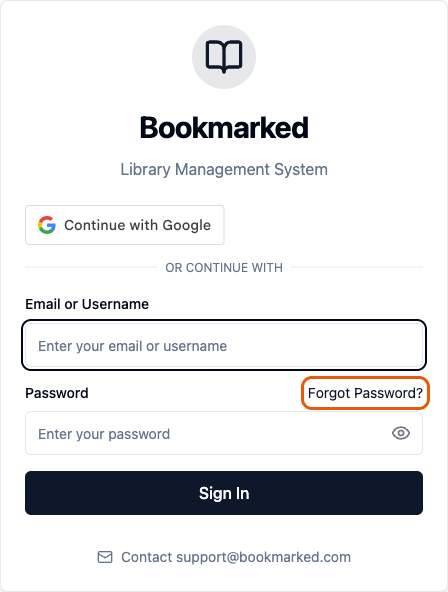
- Go to the Bookmarked sign-in page and click Forgot Password? above the password box.
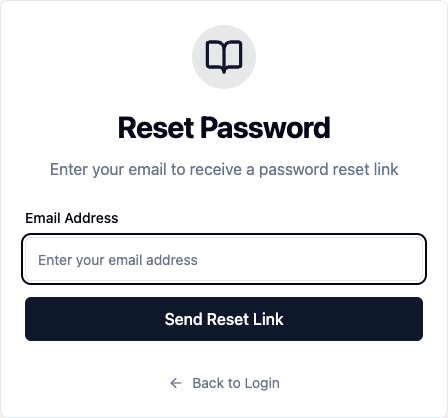
- Enter the email address for your Bookmarked account and click Send Reset Link.
- The page changes to Check Your Email. Open the email from noreply@bookmarked.com with the subject "Password Reset Request" and click Reset Password.
- On the Set New Password page, type your new password in New Password, then type it again in Confirm New Password.
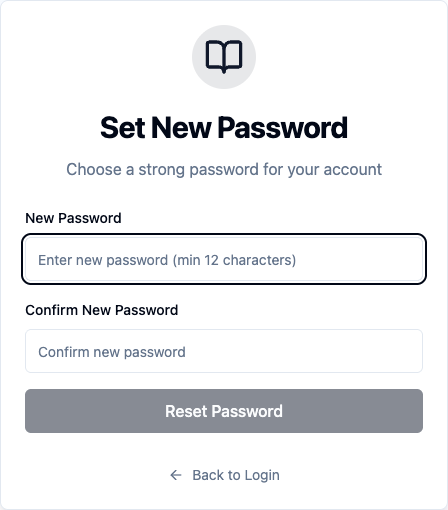
- Click Reset Password. A message confirms your password was reset, and you're taken back to the sign-in page.
- Sign in with your email address and your new password.
Choosing your new password
For a password that's accepted the first time, use:
- At least 12 characters
- An uppercase letter and a lowercase letter
- A number
- A special character, such as ! or #
As you type, a checklist under New Password marks each one, and a strength bar shows Weak, Fair, Good or Strong. If the password is too weak, you'll be asked to choose a stronger one.
Troubleshooting
- No email after a few minutes: check your spam or junk folder for mail from noreply@bookmarked.com. Make sure you typed the email address on your Bookmarked account. For your security, the page shows the same message whether or not that address has an account. You can request another link from the Forgot Password? page.
- The link says it is invalid or expired: the link is more than 24 hours old or no longer works. Go back to Forgot Password? and request a new one.
- "Passwords do not match": type the same password in both boxes.
- "Password is too weak": make it longer, or mix in uppercase and lowercase letters, a number and a special character.
- Still can't sign in: email support@bookmarked.com with your name, your school, and the email address on your account.